
A Knowledge Library should make African ancestral teachings easier to find and explore, with a clear path from a topic that interests you to material you can study. When resources cover different subjects and formats, knowing how to search and where to begin can make your exploration more focused.
You may want to read quietly, save a PDF for later, or listen while you go about your day. This guide explains how to search for teachings, read online, download PDFs, and listen to audiobooks, while showing how a library’s organization can shape your learning. Explore at your own pace, return to ideas that speak to your questions, and deepen your connection with African heritage one step at a time.
Key Takeaways
- Follow clear categories and subcategories to find teachings by topic and choose a manageable place to begin.
- Choose the format that suits your learning moment: read online, download a PDF, or listen to an audiobook.
- Use descriptive details such as keywords, document type, and creation date to understand how library materials are organized.
- Refine searches with relevant terms and filters, then explore structured learning and community access when you’re ready to continue.
Category and subcategory organization
Explore African ancestral teachings, culture, and tradition through organized topics and resources. A Knowledge Library may include online reading, PDF downloads, and audiobooks. Categories can guide you from a broad interest, such as heritage, to a focused subject, such as spiritual teachings. Each format offers a different way to engage with the material.
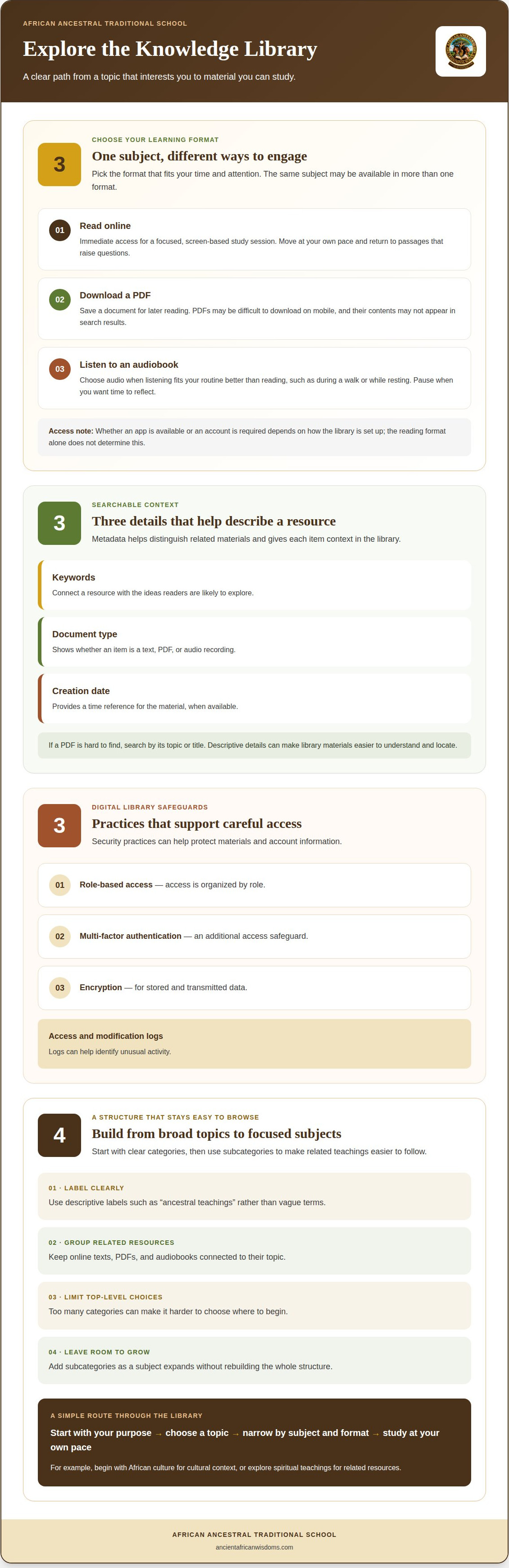
Digital libraries can face risks such as unauthorized access, exposed information, or altered files. Security practices can include role-based access, multi-factor authentication, and encryption for stored and transmitted data. Access and modification logs can help identify unusual activity. These safeguards matter because readers need confidence that digital materials and account information are handled carefully.
Start with a small set of clear, familiar categories, then use subcategories to make topics easier to browse. For example, a broad “African traditions” category could lead to focused areas for cultural teachings and spiritual practices. Organizing resources by subject helps readers find relevant material without knowing who created or maintains it. A well-structured Knowledge Library also makes related subjects easier to follow.
- Choose clear labels: Use “ancestral teachings” rather than vague terms that leave readers guessing.
- Group related resources: Keep online texts, PDFs, and audiobooks connected to their topic.
- Limit top-level choices: Too many categories can make it harder to choose where to begin.
- Leave room to grow: Add subcategories when a subject expands, without rebuilding the whole structure.
To choose a route through the library, begin with the subject that matches your purpose, then narrow your search by topic and format. A reader seeking cultural context might start with African culture, while someone exploring spiritual teachings can follow that subject into related resources. This simple approach keeps browsing focused and makes a Knowledge Library easier to revisit as your interests develop.
An information security knowledge library might organize content into categories such as Incident Response, Threat Intelligence, Compliance, Training, and Vulnerability Management. Organizing categories by task or topic can make them more resilient to organizational change than organizing them by department.
Use clear labels that avoid broad terms and jargon, and keep category structures flexible enough to expand. Limiting the number of categories also matters: too many can make it difficult for users to choose where to go.
Reading online, downloading PDFs, and audiobooks
Choose a format that suits the time and attention you have. Online reading works well for a focused study session, while a PDF can be saved for later. An audiobook lets you listen to teachings during a walk or while resting. The same subject may appear in different formats, so check the title and description before you begin.
A dedicated app and an account are separate access choices. Reading formats alone do not determine whether an app is available or an account is required; that depends on how the library is set up.
For online reading, open the selected text and move through it at your own pace. Pause to reflect on a passage, then return to any section that raises a question. For example, if you are exploring a teaching about heritage, start with a short passage rather than trying to absorb a long text in one sitting.
- Read online: Choose this for immediate access and a screen-based study session.
- Download a PDF: Save a document when you want a copy available for later reading.
- Listen to an audiobook: Use audio when listening fits your routine better than reading.
PDFs have practical limitations. They can be difficult to download on mobile devices, and their contents may not appear in search results. If a document is hard to find, search the library by its topic or title before trying another format. A short introduction to the PDF’s contents can also make it easier to find through search.
For an audiobook, note the title and subject before pressing play. Listening can make a teaching easier to revisit, but an unfamiliar idea may call for slower reflection. Pause when a passage feels meaningful, then resume when you’re ready. Readers who prefer a steady, guided path can continue exploring African ancestral learning through the library’s available resources.
Knowledge library definition and components
A digital collection can help readers find, interpret, and revisit related material. For African ancestral teachings, resources might include written teachings, cultural stories, and audio recordings. A well-organized Knowledge Library connects each item with details that explain its subject and format.
Compared with a broad reference platform, a focused library brings related subjects together, making it easier to explore one area in depth. The practical comparison is how clearly each platform labels, describes, and connects its materials.
Ownership and operation are distinct responsibilities: an owner controls the library and its materials, while an operator maintains access and organization. Look for publisher and maintainer details to understand who is responsible for each role.
Reliability depends on clear authorship, dated records, and regular content maintenance. Resources with named owners, review histories, and visible creation dates are easier to assess than items without those details.
Metadata gives each item searchable context. A teaching might include keywords, document type, and creation date. These details help distinguish a written explanation from a story or audio resource, even when they address related themes.
- Keywords: Connect a resource with the ideas readers are likely to explore.
- Document type: Identifies whether the item is a text, PDF, or audio recording.
- Creation date: Provides a time reference for the material, when available.
Maintenance also shapes trust. Designated content owners can review material, correct errors, and update records as needed. Version control preserves document changes, helping readers and maintainers track revisions and distinguish an older file from a newer one.
A content audit helps identify valuable resources, gaps, and material that needs revision or removal. Usage patterns can show which pages readers revisit, while feedback may reveal confusing descriptions. Together, these practices help keep stories and teachings organized, understandable, and useful in a Knowledge Library.
Metadata and tags can include keywords, document type, creation date, and relevant security domains. Keeping these fields together gives each record descriptive and organizational context. Keywords, document type, and creation date help readers identify materials, while security domains provide another way to organize records. Using these fields consistently can make a library easier to browse and review.
Search functionality
Begin with a clear subject, then refine your wording as results appear. For example, search “ancestral teachings” first, then try “African spiritual traditions” for a narrower focus. A specific phrase can return more relevant resources than a broad term such as “culture.” A Knowledge Library search works best when your words reflect the particular teaching or question you have in mind.
A useful Knowledge Library should support keywords, filters, and advanced search options. These tools help readers move from a general interest to a particular resource type or subject. Filters can narrow results, while advanced search can combine details when one phrase returns too much material. For instance, someone looking for written resources can combine a subject term with an available format filter.
Try these steps to make each search more purposeful:
- Use specific terms: Search “ancestral stories” rather than “stories” when that matches your interest.
- Change one word: If results feel too broad, replace a general term with a distinct topic.
- Apply a filter: Narrow results by available details, such as resource format or subject.
- Review the description: Confirm that a result fits your question before opening or saving it.
Consistent tags help resources appear in relevant searches. A text about a spiritual practice, for example, can be tagged with its subject and related terms, helping readers find it with different useful phrases. Clear titles and descriptions also affect search results, especially when a PDF’s contents are not indexed as searchable text. In a well-organized Knowledge Library, these details connect queries with relevant material.
Refine your search in small steps. Start with a broad topic, inspect the wording used in relevant results, and try one of those specific terms. If you’re seeking a teaching to study more deeply, explore African ancestral teachings and follow the topic that best matches your purpose.
African Ancestral Traditional School
African Ancestral Traditional School offers a structured next step when you want to move beyond browsing and study African spirituality, culture, and tradition in greater depth. Its school levels provide a learning path, while Ancestral Spiritual Teachings and Community Access support continued exploration and connection. Spiritual Rituals are also part of its offerings.
Choose structured learning when you are ready for a more guided way to engage with ancestral knowledge, rather than gathering resources one at a time. You can follow your interests at a considered pace and build understanding through study.
Contact African Ancestral Traditional School to explore whether this learning path fits your next step.
Carry Your Learning Forward
Let your next step be guided by the question you want to sit with, not by pressure to learn everything at once. Return to a teaching that resonated, notice what it invites you to explore, and give that reflection room to deepen. A Knowledge Library can be a starting point; steady study helps turn discovery into a more meaningful relationship with heritage.
If you are ready for more structure, Ancient African Wisdoms offers four learning levels, beginning with Level One, Roots, and its five foundation courses, each eight weeks long. The courses, ancestral spiritual teachings, and community access offer ways to continue learning and connect with others as you explore African spiritual traditions.
Contact African Ancestral Traditional School to discuss a thoughtful next step in your learning. Let curiosity lead, and allow your path to unfold with care.
Frequently Asked Questions
What does “Knowledge Library” mean?
A Knowledge Library is a curated collection that brings related learning resources together for discovery and study. It can include articles, lessons, stories, and audio arranged around a shared subject. For example, a reader exploring African heritage might use one collection to encounter cultural teachings in several formats, rather than treating each resource as unrelated.
What is the Knowledge Library website or platform?
The phrase describes a type of digital learning space, not one universal website or software product. A platform might include a home page, topic pages, resource descriptions, and access to individual materials. For African ancestral learning, the aim is to bring teachings and cultural resources into an online setting where readers can explore them at their own pace.
How do I access or use Knowledge Library?
Start at the library’s main page and follow its navigation to a subject that matches your interest. Read a resource description before choosing how to study it, so you understand what it covers. Access requirements vary by platform: use its browser-based pages, follow any sign-in prompts, and choose a listed reading or listening format that suits your needs.


